

Overview
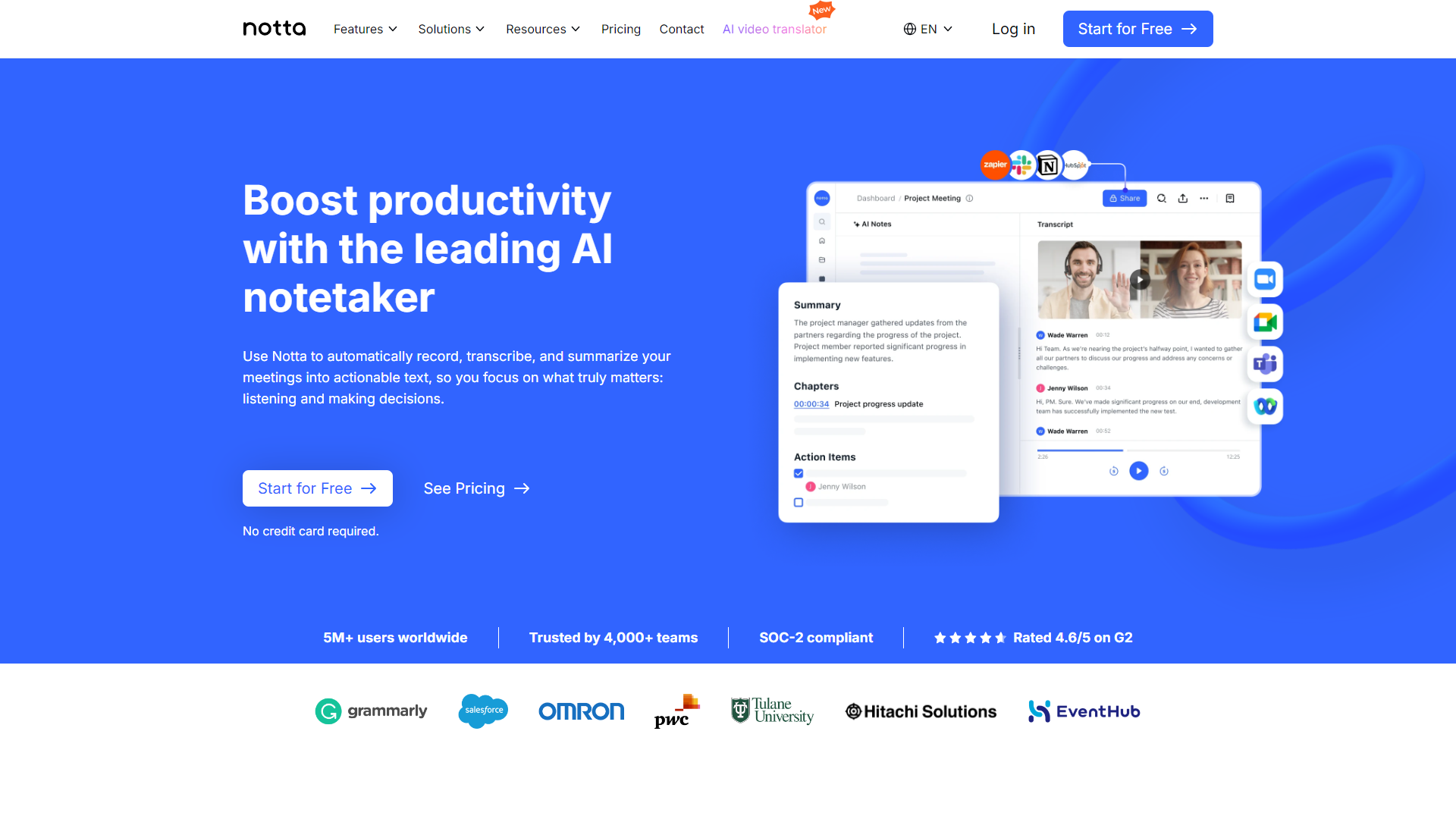
Notta is an innovative tool that transforms spoken words into written text. Designed for students, professionals, and anyone who needs to capture spoken information quickly, Notta makes it simple to record conversations and meetings. It supports multiple languages, making it a versatile tool for users worldwide.
Pros
- High accuracy
- Flexible language options
- Convenient for note-taking
- Time-saving
- Affordable plans
Cons
- Subscription-based model
- Limited free version
- Requires internet for some features
- Occasional misinterpretations
- Learning curve
Clone Notta with AI
Create your own version of Notta — no coding needed. AI builds it for you in minutes.
Key features
Real-time transcription
Notta provides instant transcription, enabling users to see their words appear on the screen as they speak.
Multi-language support
The app can transcribe speech from several languages, allowing users to work in their preferred language.
Audio and video uploads
Users can upload pre-recorded audio or video files for transcription, making it perfect for lectures and conferences.
Smart search function
Find specific words or phrases easily in your transcriptions with the smart search feature.
Collaboration tools
Users can share their transcriptions with others, enhancing team collaboration and productivity.
Offline mode
Notta can be used offline, meaning you can transcribe anywhere without worrying about internet connection.
Speaker recognition
The app distinguishes between different speakers, helping to keep track of who said what during conversations.
User-friendly interface
The app is designed for ease of use, with a clean interface that makes navigation simple.
Rating Distribution
Pricing
| Plan | Price | Description |
|---|---|---|
| Free | $0.00 (1 Seat Per Month) | For individuals just getting started with Notta. |
| Pro | Starting at $9.00 (1 Seat Per Month) | For professionals who want more minutes and features |
| Business | Starting at $16.67 (1 Seat Per Month) | For teams that need collaboration and administration features |
| Enterprise | Contact Us (51 Seat) | For organizations looking for advanced security, controls, and support |
Screenshots
User Reviews
View all reviews on G2Great Price - Worth the small inconveniences
What do you like best about Notta?
Program is very easy to use, is reasonably priced, and allows me to buy a lot of time at work.
What do you dislike about Notta?
The script speaker glitches sometimes, and it does not identify voies as well as I hoped for.
What problems is Notta solving and how is...
Misleading Trial Terms and Deceptive Billing Practices
What do you like best about Notta?
Notta is not suited for B2B conversations in multilingual environments, even when speakers are at a C2 proficiency level. The transcription quality is unreliable, with frequent errors and misinterpretations. The product struggles with accurately capturing context a...
Language Interpretation
What do you like best about Notta?
What is impressive is the transcription and the speed at which it is done.
What do you dislike about Notta?
The problem is the understanding of the non-native language, which is different from English, because when transcribing into Portuguese, many errors appear,...
Cumbersome
What do you like best about Notta?
I like the summaries, however they are. far from accurate
What do you dislike about Notta?
The overall tool is cumbersome and has a number is program issues. the system dhould identify the voices and automatically apply the association to each voice. This didn't h...
Enhancing Learning with Notta: A Neurodivergent MBA Student’s Review
What do you like best about Notta?
As a neurodivergent MBA student, Notta's cross-platform functionality has been crucial for recording lectures on both my laptop and phone, ensuring I never miss important details. Its video recording capability is particularly beneficial, capturing visual aids and ...
Company Information
Alternative Voice Recognition tools
Explore other voice recognition tools similar to Notta



FAQ
Here are some frequently asked questions about Notta.
What is Notta?
Notta is a speech-to-text tool that helps you transcribe spoken words into written text.
How does Notta work?
You can speak into the app, and it instantly transcribes your words into text on the screen.
Can I use Notta offline?
Yes, Notta has an offline mode that allows you to transcribe without an internet connection.
Is Notta available in multiple languages?
Yes, Notta supports several languages for transcription.
Do I need to pay for Notta?
Notta offers a free version, but to access additional features, a subscription is required.
Can I upload pre-recorded audio files?
Yes, you can upload audio and video files for transcription through Notta.
Does Notta recognize different speakers?
Yes, Notta has a speaker recognition feature that identifies who is speaking in a conversation.
How accurate is Notta's transcription?
Notta has high accuracy rates, but like any tool, it may occasionally mishear words.